New: LED layout · Edge roll · Shop fonts · Open PDF/AI
Sign design → G-code in one web app
Gcodai Studio is online CNC and laser CAM software for sign shops and CNC makers. Nothing to install: type text or import a file, and it picks the bits, depths and speeds for you. See a 3D simulation before you cut, then get a file ready for your machine.
Auto bits & feeds3D simulation before you cutGRBL · Mach3 · NcStudio · DSP · Syntec + 7 more
gcodai.com/app
Problems CNC users face every day
Cut real jobs without being a CAM expert
Gcodai handles the hard parts for you. You just say what kind of part you want.
“The software is confusing, with too many buttons”
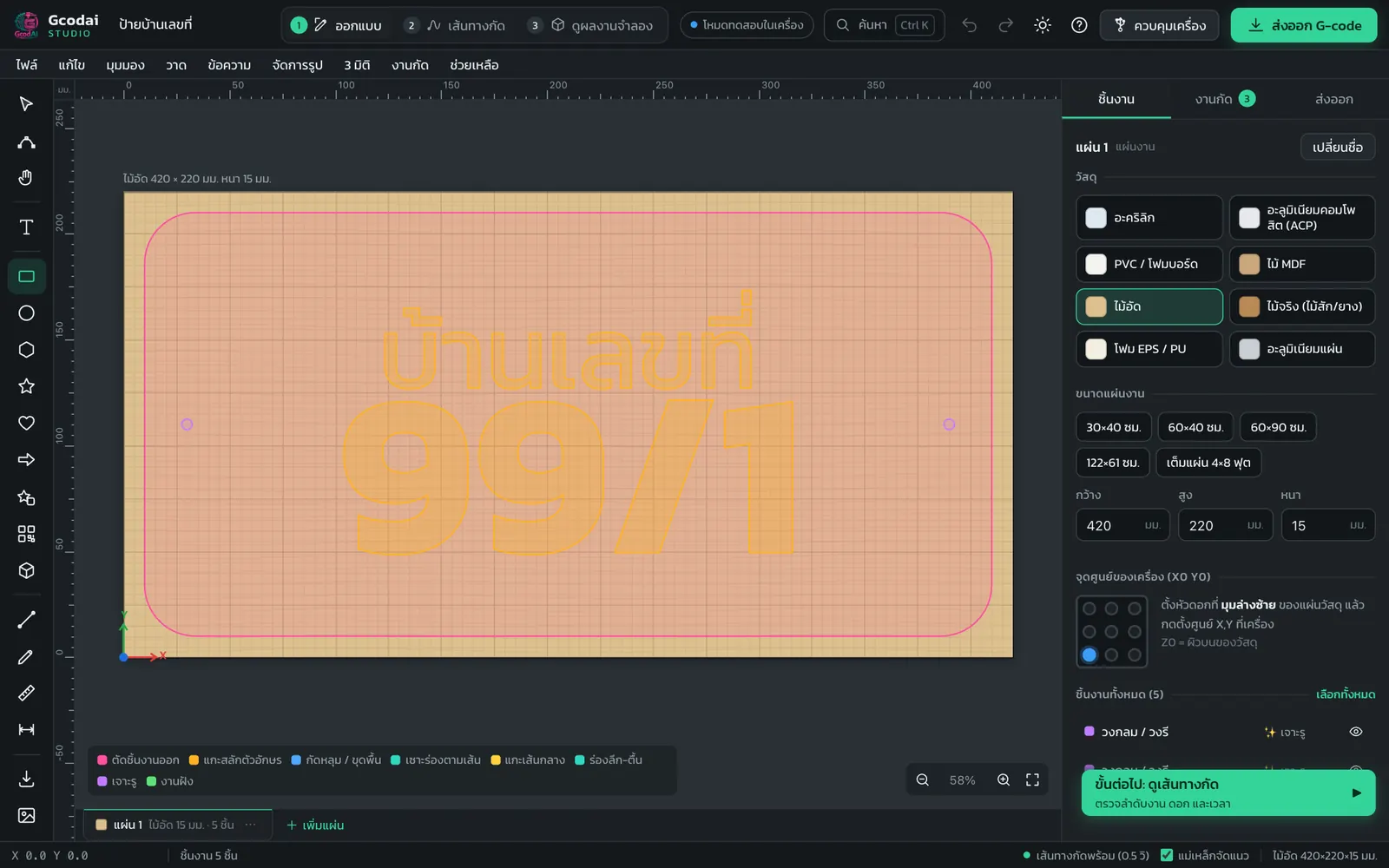
Plain menus, 4 simple steps
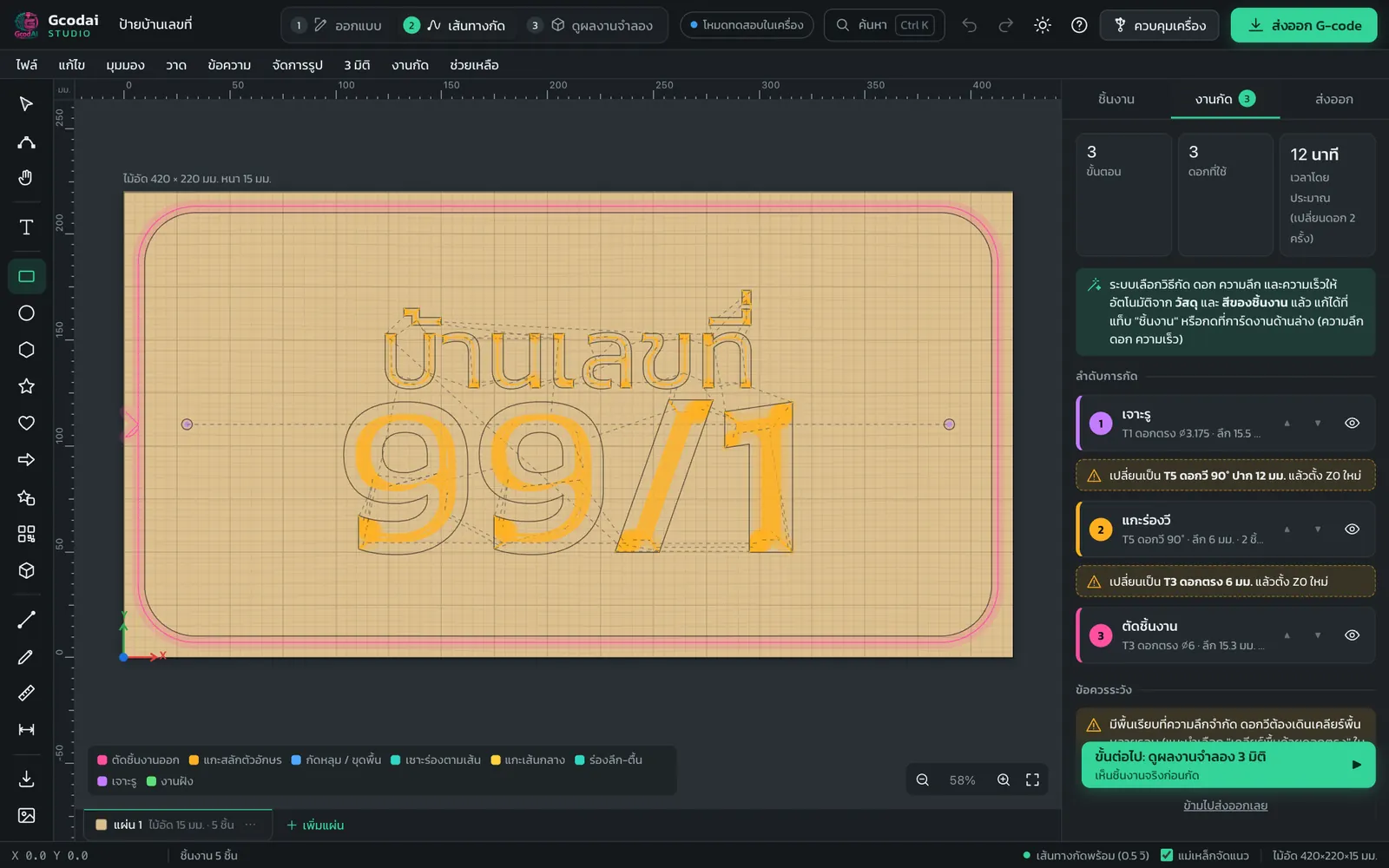
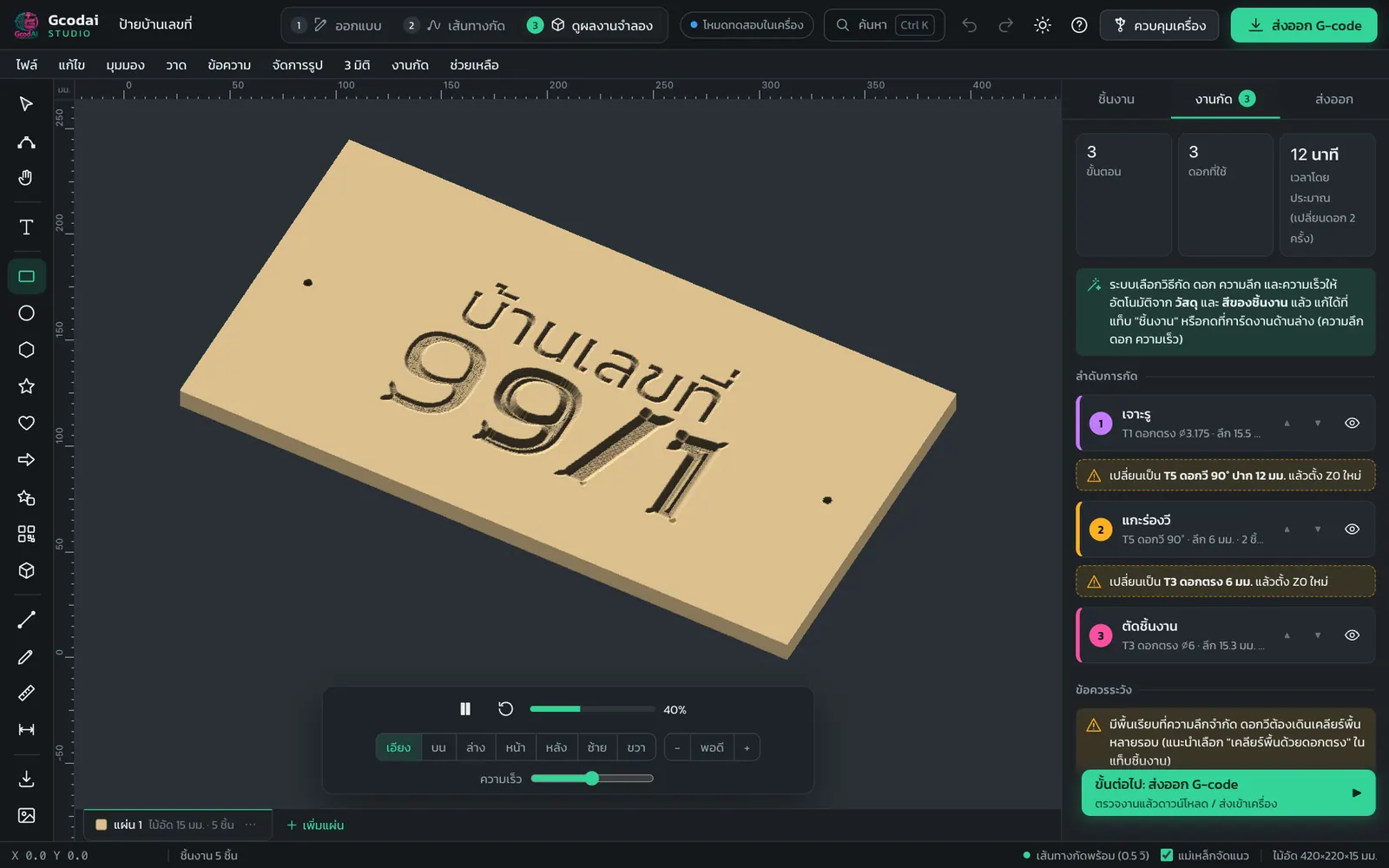
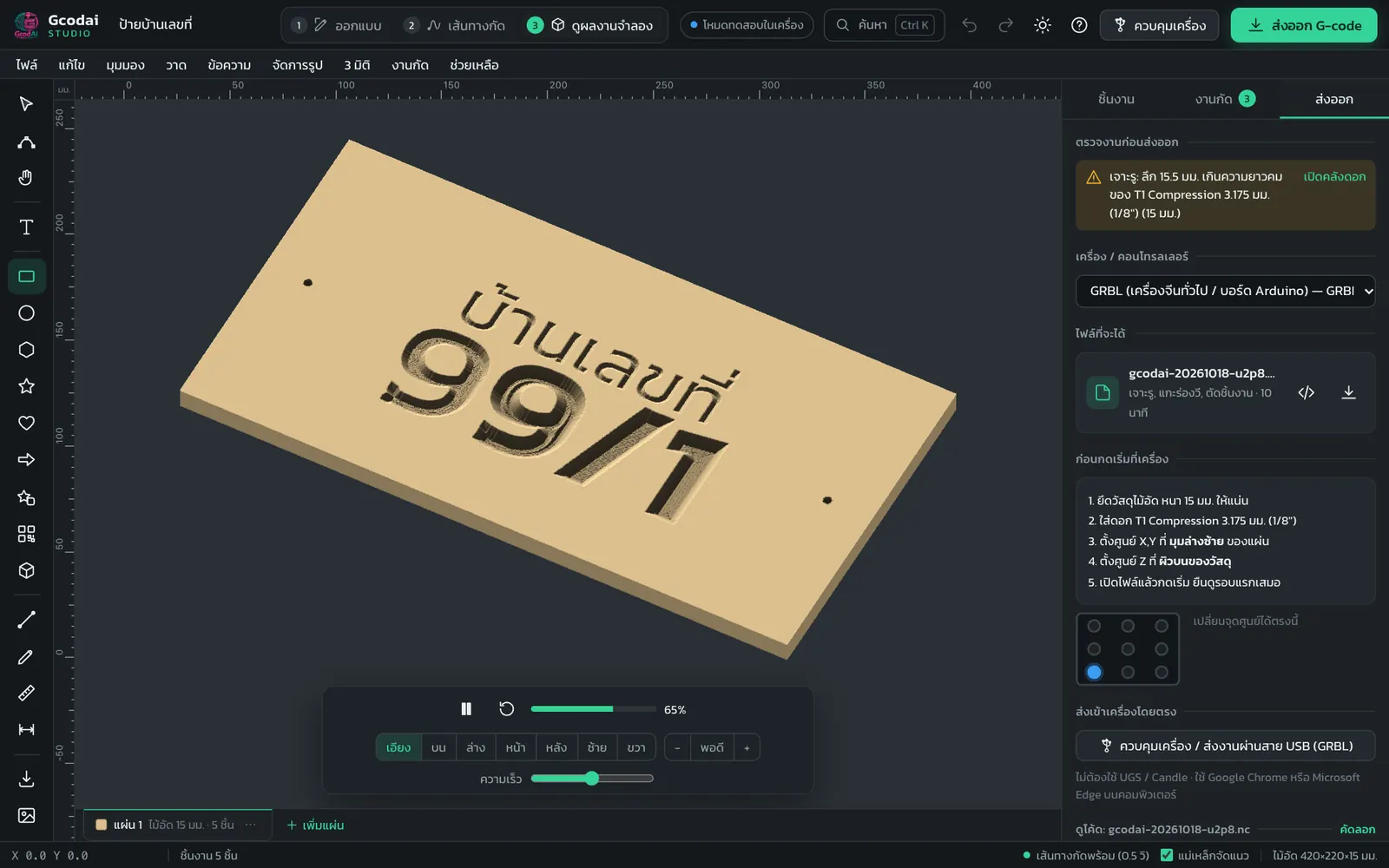
Design → Toolpaths → Simulate → Export. A “Next step” button walks you through one step at a time, and you can search for any command (Ctrl+K). Thai interface also available.
✓ Beginners finish their first job in minutes
“Wrong bit, depth or speed: broken bits, ruined jobs”
Settings chosen from your material
Pick the material and the system calculates depth per pass, feed rate and spindle speed, and picks a bit with a long enough cutting length. It checks the job before export, with a “Fix it” button.
✓ See a 3D simulation before wasting real material
“The file doesn't match my machine and throws errors”
Files that match your machine type
Choose once: GRBL, Mach3, NcStudio, DSP Richauto, Syntec/LNC, LinuxCNC, MASSO and many more. For unusual machines, you can customize the file format yourself.
✓ GRBL machines: plug in USB and run jobs from the web
How it works
From idea to cutting machine in 4 steps
Click each step to see the real program screen
Step 1 · Design
Use the tools on the left, or File → Open / Import file · File → Example jobs
Projects
Real sign shop jobs, with examples you can open and edit
Every image is a real program screen. Click an image to view it full screen.
V-carved wooden signs
Crisp lettering, depth follows the stroke width, with a flat-bottom option for large letters
Choose V-carve
Acrylic / PVC letters
Cut out letters with tabs. The system picks an O-flute bit for clear edges that don't melt.
Choose Profile cut
Neon flex grooves
Runs along the center of the line, leaves the floor thickness you set, and fits the neon flex exactly
Choose Groove on the line
Batch production
Auto nesting by true shape saves material and can split parts across several sheets
Menu Arrange → Auto nesting
Inlay
Pockets the recess and makes the mirrored plug automatically, for a perfect fit with no math
Choose Inlay
3D slat walls
Turns a 3D model into wooden slats, with interlocking comb rails, assembly numbers and nesting on sheets
Menu 3D → 3D slat wall
4-axis (rotary) work
Engrave names around a cylinder, square table legs, and 3D carving around a cylinder from STL files
Menu Machining → 4-axis rotary
Job pricing + quotations
Works out material cost, machine cost from the real cutting time and your profit, then prints a quotation for your customer
Tab Export → Job pricing
LED illuminated letters
Places LED modules in the letters automatically and counts them, with total watts and the power supply you need
Menu Signs → LED layout in letters
Edge roll (light box letters)
Unrolls letter returns into ACP strips with fold grooves, joints and flanges, nested on sheets ready to cut
Menu Signs → Edge roll
Table legs and balusters on a rotary axis
Pick a ready-made shape or draw your own profile. No 3D file needed: you get the turning job with a simulation.
Menu 3D → Revolve
Icon library + sign frames
281 icons, 29 frames and decorations including modern Thai patterns, all searchable
Menu Draw → Icon & sign frame library
New · 3D slat wall
From a 3D model to a real wooden slat wall
In the video: a 120 × 200 cm face wall in 9 mm HMR plywood with 9 mm slat spacing gives 65 slats from 16 sheets, and the curls of the hair become real shelves. (Video in Thai; every step is shown on screen.)
Slices real cross-sections of the model; enter the wall size, wood thickness and spacing
Wall-mounted comb rails, interlocking slats, equal spacing on every slat
Engraves an assembly number on every slat, nests them on sheets, exports G-code
Link QR, WiFi QR and PromptPay QR (Thai payments), engraved on a sign or cut as a stencil
Menu: Draw → QR Code
Finger-joint boxes
Create finger-joint boxes with lids and dividers. Enter the size and wood thickness and get every part to cut.
Menu: Draw → Box maker (finger joints)
Profile cuts + tabs
Outside / inside / on the line, ramped plunges, curved lead-ins, custom tabs, final finishing pass
What should this object do?: Profile cut (cut out)
V-carve
V-grooves deep as the stroke is wide, flat-bottom option that clears the floor with a flat end mill, sharp 3D corners
What should this object do?: Letter carving (V-carve)
Pocket
Offset or zigzag, two-bit pockets (a smaller bit cleans the corners), any depth you set
What should this object do?: Pocket
Grooves / on the line / ACP fold grooves
Neon flex grooves, variable-depth grooves, and fold grooves for aluminium composite panels with an ACP grooving bit
What should this object do?: Groove on the line
Drilling + inlay
Peck or helical drilling, letter inlays with matching plugs, dogbone / T-bone corners for joints, edge chamfers with a V-bit
What should this object do?: Drilling · Inlay
Laser work
Power, speed and number of passes per job, area fill (hatch), files for LaserGRBL / LightBurn
Machine type: GRBL laser
Automatic bits & feeds
Based on the material, bit diameter and flute type (compression, O-flute, up/down-cut), and picks a bit with a long enough cutting length
Works on every object automatically
Line colors in the file → machining jobs
Black cuts through, red grooves, green pockets, orange V 3D, yellow on the line, purple drills. Import and every job is set up.
Menu: Machining → Line colors → Jobs
Pre-export check + fix-it buttons
Deeper than the sheet, bit wider than the groove, cutting length too short, job outside the machine work area: each warning comes with an instant fix button
Tab: Export
Command search
Press Ctrl+K and type “bit”, “depth” or “stepover” to find commands, settings and shop terms
Search button at the top
Sign design assistant
Describe the sign in a Thai sentence, for example “wooden sign 40×20, coffee shop, V-carve, phone number”, and get 3 sign designs to choose from
Menu: Draw → Sign design assistant
Catalog of 100+ CNC bits
Grouped and searchable: flat end mills, compression, O-flute, V-bits, ACP grooving bits, neon flex bits, ball nose. Add them to tool library slots T1–T12.
Menu: Machining → Bit catalog
Reliefs from images / STL
Images become reliefs, STL models become 3D jobs, with roughing and ball nose finishing
Menu: 3D
3D slat wall
STL models become wooden slats with interlocking comb rails and assembly numbers, nested on sheets, exported as DXF, SVG or G-code
Menu: 3D → 3D slat wall
Halftone photo engraving
Photos of people, pets or landscapes engraved as dots with a V-bit, for a shaded image on the board
Menu: 3D → Photo → Halftone
4-axis + two-sided jobs
A-axis rotary engraving around a cylinder, indexed rotary, 3D carving from STL, and two-sided jobs with dowel holes for alignment
Menu: Machining → 4-axis rotary
Auto nesting
By true shape, with rotation, across multiple sheets in one job. Download every sheet together as a ZIP.
Menu: Arrange → Nesting
Job pricing + quotations
Material cost, machine cost from the real cutting time and profit, then print quotations and shop work orders
Tab: Export
Save jobs · recent jobs · account sync
.gcodai files store the bits used, the last 10 jobs are kept, and machine settings / tool library follow your account to every computer
Menu: File
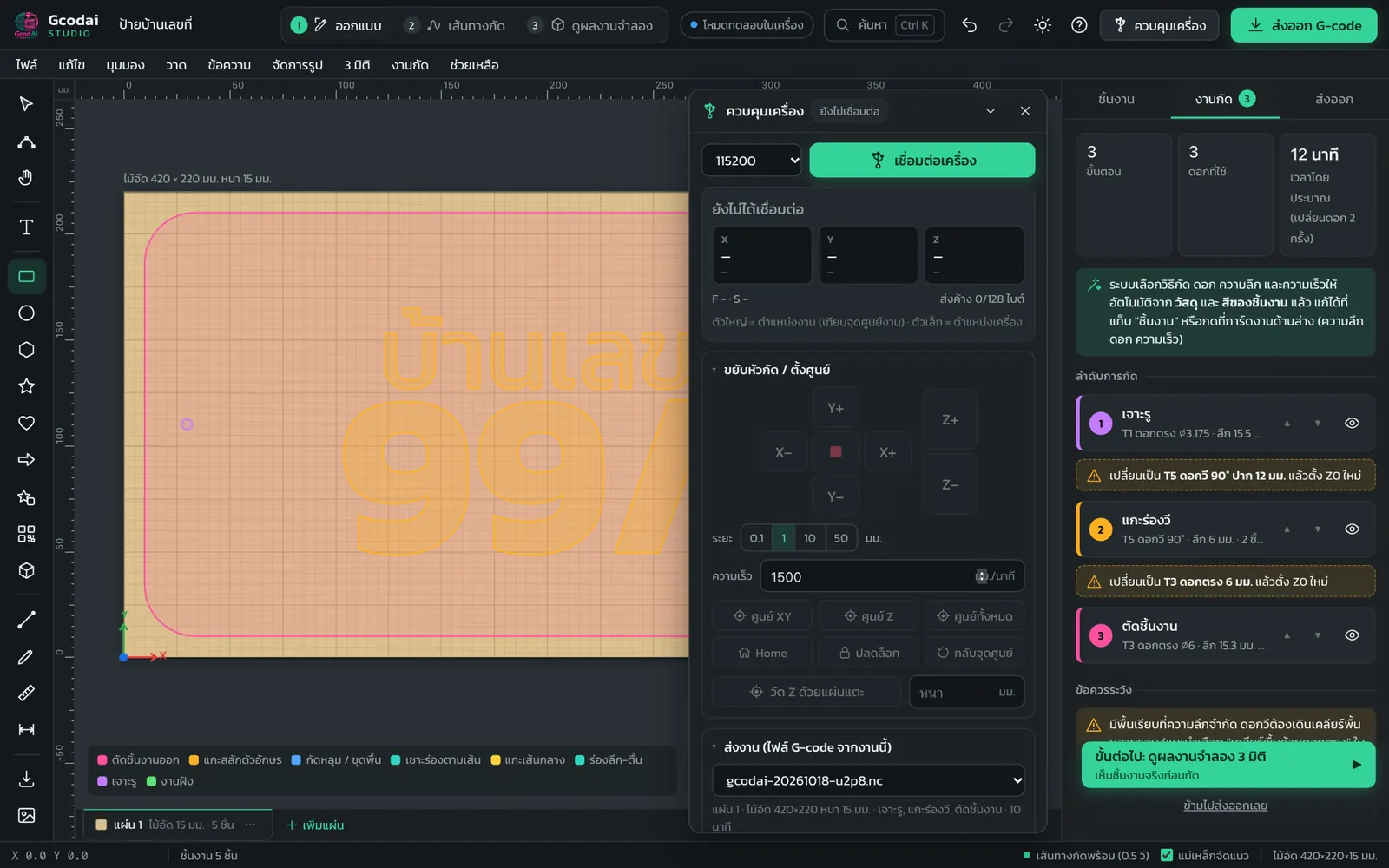
Control GRBL machines over USB
Jog, set zero, probe Z with a touch plate, send jobs, pause / resume, adjust speed while cutting, resume from mid-job
Button: Machine control
Files for 12 machine types + your own
GRBL · Mach3/4 · NcStudio · DSP · Syntec/LNC · LinuxCNC · UCCNC · MASSO · grblHAL · Centroid · ISO · laser, plus a page to customize the file format yourself
Tab: Export → Machine type
LED layout in letters
Pick an LED model and the system places modules in the letters, counts the watts, suggests the power supply and wire size, and drills wire holes
Menu: Signs
Edge roll (letter returns)
Light box signs: letter returns become strips with V-fold grooves, joints, flanges and face panels, nested on sheets to cut
Menu: Signs
281 icons + 29 sign frames
Phone, map, restaurant, restroom, arrows, plus frames, ribbons, badges and modern Thai patterns, all resizable
Menu: Draw → Icon & sign frame library
Revolve (turned shapes)
Table legs, balusters, bed posts and vases turned on a rotary axis. Pick a shape or draw your own profile, with optional lengthwise flutes.
Menu: 3D → Revolve
Customize the machine file format
Header, tool change, footer, decimals and comments, with a live code preview. Save it as “My machine” and share the file.
Tab: Export → Customize file format
Edit G-code in the program
Find, replace, go to line, view file statistics, then re-simulate before downloading
Tab: Export → Edit code
Supported machines
Works with the CNC machines you already have
Gcodai creates G-code for every machine on the list, and has built-in control for GRBL machines
Send G-code files to your machine
Choose your machine type once and files come out in the right format. Open them in your machine's software or copy them to a USB stick.
GRBLMach3 / Mach4NcStudio (Weihong)DSP Richauto A11Syntec / LNC (ATC)G-code ISO / FanucLinuxCNCUCCNCMASSOgrblHAL / FluidNCCentroid AcornGRBL laser / LightBurn+ customize the file format yourself
Control GRBL machines from the web
Plug in the USB cable and open in Chrome or Edge to replace UGS / Candle · Mach3, NcStudio and DSP machines are still controlled by their own software, but can use files from Gcodai
JogSet zero X Y ZProbe Z with a touch platePause / resumeAdjust speed while cuttingResume from mid-job
Buying during the launch is the best deal. After the promo, it will be sold as 3 plans (Starter · Sign Shop · Complete). The Complete plan's regular price is 16,900 THB. Buy now and get every function for life, including future functions.
New features are free for the plan you bought, no monthly fee · the order may change based on what users need
In development
Photo → 3D model with AI
Take a photo of a face, a pet or an object and get a relief ready to carve, or turn it into a 3D slat wall right away
In development
Loft / Revolve surfaces
Create 3D surfaces from profile curves, such as turned table legs, edge mouldings and double-curved patterns
Planned
V-carve inlay
Two-tone wood inlays with a V-bit and tight, sharp edges, for premium signs and decor
Planned
Waffle 3D slat structures
Slats in two directions slot together into a lattice, for free-standing sculptures
Planned
Cloud-saved jobs + teamwork
Keep jobs in your account, open them on any computer, and share jobs and the tool library within your shop
Planned
Laser: kerf compensation & photo engraving
Compensate for beam width so parts fit exactly, and engrave shaded photos with the laser
FAQ
What CNC users want to know before starting
What is Gcodai Studio?
Gcodai Studio is web-based CAM software for CNC routers. You design signs and parts, then create ready-to-cut G-code. It picks bits, depths and speeds automatically and simulates the cut in 3D before you cut for real. It opens straight in your browser, with nothing to install.
Which CNC machines does it work with?
It exports G-code in 12 formats: GRBL, grblHAL/FluidNC, Mach3/Mach4, NcStudio (Weihong), Richauto A11 handheld DSP, CNC-ATC with automatic tool change (Syntec/LNC/Fanuc), LinuxCNC, UCCNC, MASSO, Centroid Acorn, standard ISO G-code and GRBL laser. If your machine is not on the list, you can customize the file format yourself. GRBL machines can be controlled over USB directly from the program.
Can it replace Mach3 or NcStudio?
Gcodai Studio does the design and G-code generation (CAM) for Mach3 and NcStudio machines, but you still control the machine with its original software, because the controller is tied to that brand's card. For GRBL machines, Gcodai can control the machine over USB in place of UGS or Candle.
Do I need to install anything?
No install needed. Open gcodai.com/app in Chrome or Edge on a computer and start right away. You can also design and simulate on a tablet or phone.
Which files can I import?
Import SVG, DXF, EPS, AI, PDF, PNG/JPG images (convert to vectors, reliefs or halftone dots), STL models, and open existing G-code files to view the simulation. Line colors in the file set the machining jobs automatically.
Can it V-carve Thai lettering?
Yes. Type Thai text with the 8 built-in fonts or add your shop's own fonts (TTF/OTF). Vowels and tone marks sit in the right place. Choose V-carve and the system picks the V-bit and calculates the depth from the stroke width. There is also a flat-bottom option that clears the floor with a flat end mill for wide letters.
How does it help prevent broken bits and ruined jobs?
The system calculates depth per pass and speeds from the material and bit size, picks a bit with a long enough cutting length for the depth, checks the job before export with fix-it buttons (for example deeper than the sheet, or bit wider than the groove), and lets you check the 3D simulation before cutting for real.
Can I make a 3D slat wall from a model?
Yes. Use 3D → 3D slat wall, import an STL file, and enter the wall size, wood thickness and slat spacing. The system slices real cross-sections into slats, creates interlocking comb rails for the wall, engraves assembly numbers, nests the parts on sheets and exports G-code.
Can I make illuminated letter signs (light boxes)?
Yes. In Signs → LED layout in letters, choose an LED model and the system places modules in the letters, counts them, totals the watts and suggests the power supply and wire size. In Signs → Edge roll, it creates the return strips with V-fold grooves, joints and face panels, nested on sheets ready to cut.
How much does it cost? Is there a monthly fee?
3-day free trial, every feature. Designing and simulating are free with no limit. Pay once and use it for life, no monthly fee. There are 3 plans: Starter 1,990 THB (regular 4,900) · Sign Shop 3,990 THB (regular 9,900) · Complete 6,990 THB (regular 16,900). Promo prices until Oct 31, 2026. Upgrade any time and pay only the difference. Pay by PromptPay QR or credit/debit card, with automatic activation.
Is there a user guide?
Yes. The lesson-style guide at gcodai.com/en/docs/ explains every button and tool, lets you search questions, and tells you where to click for each kind of job.